1
/
of
7
Weavixol
Weavixol Brushless Drone With Camera For kids And Beginner, Toy Drones With Screen On Controller, No Phone Needed, Entry-level Drone For Kid 8-12 With Auto Hover, Easy to Fly, One Click Take Off/Land, No FAA, Under 249g, 2 Batteries, SD Card
Weavixol Brushless Drone With Camera For kids And Beginner, Toy Drones With Screen On Controller, No Phone Needed, Entry-level Drone For Kid 8-12 With Auto Hover, Easy to Fly, One Click Take Off/Land, No FAA, Under 249g, 2 Batteries, SD Card
Regular price
$89.99 USD
Regular price
$89.99 USD
Sale price
$89.99 USD
Taxes included.
Shipping calculated at checkout.
Quantity
Couldn't load pickup availability
Brand: Weavixol
Color: Midnight Black
Features:
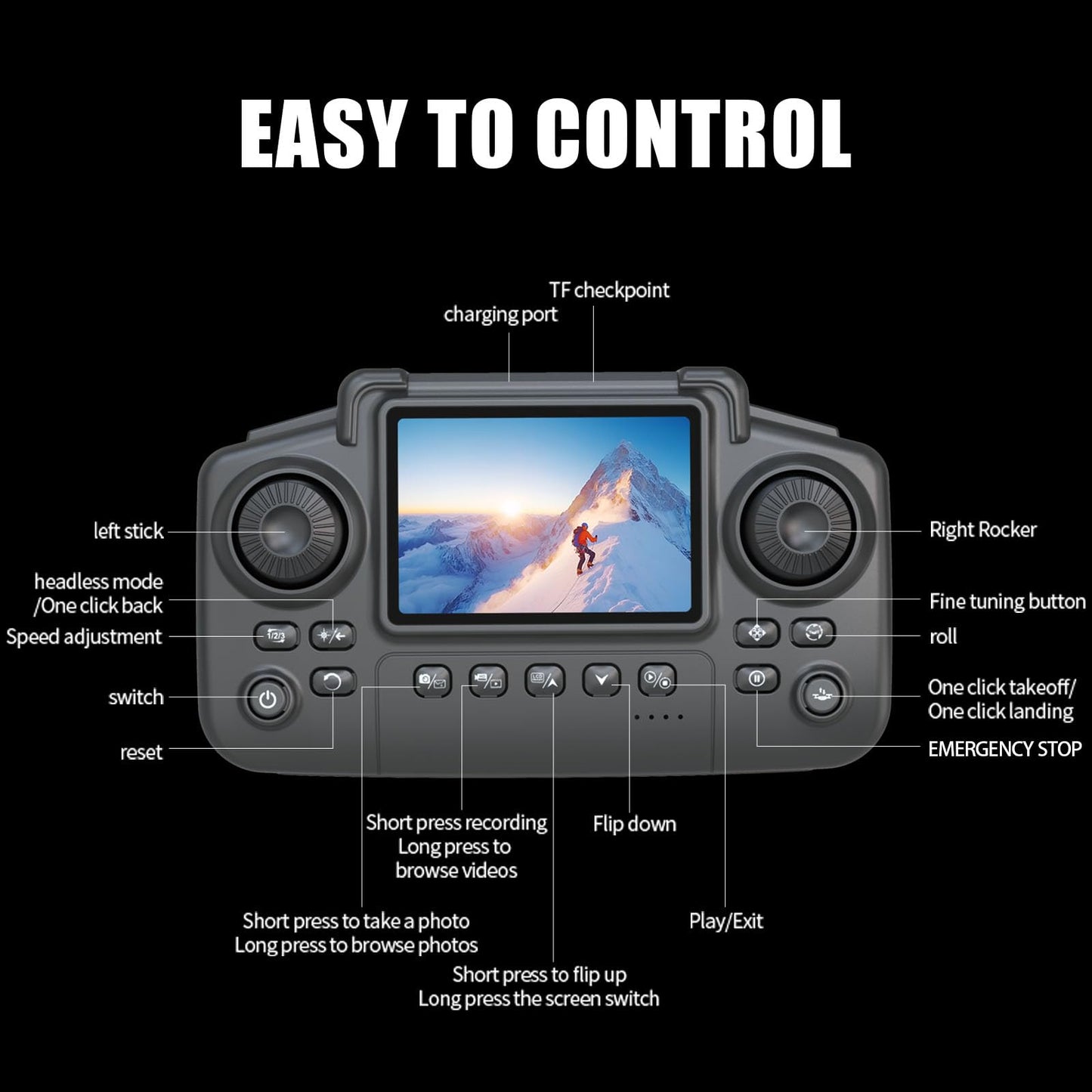
- 【Drone with Screen for Kids】:The Weavxiol K13MAX is a fantastic beginner drone featuring a controller with a built-in display for more convenient flying. It's equipped with brushless motors for increased power and greater durability. Beginner-friendly functions like one-touch takeoff/landing, headless mode, 360° flips, and altitude hold let you quickly master the essentials of flight.
- 【Entry-level Camera Drone】:This mini drone features a HD camera with a 110° wide-angle lens for an expansive field of view. Effortlessly capture impressive aerial footage and instantly share those special moments with loved ones. While it doesn't offer electronic adjustment, the lens can be manually tilted 90 degrees.
- 【Ultra-lightweight, No FAA,longer battery life】:This drone is an excellent choice because it weighs below 250 grams and requires no FAA registration or Remote ID. Includes two rechargeable batteries, each providing up to 12 minutes of flight time, so you can enjoy a longer, more immersive aerial experience.
- 【Important Charging Info Before You Buy】:If the remote emits a constant beeping sound, this isn't a malfunction – it's a low battery warning. Since the drone is battery-powered, low charge will cause expected issues like lost signal and reduced motor power. Always check battery level first if anything seems wrong.If the battery won’t charge, it’s likely that your charger isn’t compatible. You can try swapping out the charger or simply connect the device to a USB port on your computer to recharge it
- 【Level Calibrate and Trim Adjustment for Drift Correction】:Always perform level calibration before takeoff — this is critical for stable flight. Calibration ensures accurate attitude data for the current flight. To calibrate: place the drone on a level surface, push both controller sticks down and outward (left joystick ↙ bottom-left, right joystick ↘ bottom-right) and hold for 2 seconds. This is an essential step every pilot should make routine – please don't skip it.If the drone begins to drift, use the TRIM button on the remote controller to adjust.
- 【How to connect a mobile phone】:The drone's WiFi can only connect to one device at a time. For example, if the remote controller is connected, your phone won't be able to connect. If you want to connect your phone to the drone, here's how to do it right: First, make sure the controller is completely powered off. Then start up the drone itself and connect your phone to its WiFi network. Once you're connected, open the drone app on your phone – that'll get the live video feed working. Only after you've got the video stream should you finally power up the remote controller to establish the control link.
- 【First flight tips】:Due to drone operational complexity, thoroughly review the user manual before takeoff, and choose a windless open area, keep the altitude below 30 ft and the distance below 100 ft to help better practice and control the drone.Just so you know, the K13 is designed as a beginner drone, so it doesn't come with GPS or auto-return features. That means you'll need to keep a close eye on your signal bars and avoid pushing its range limits(328 ft).
Part Number: K13MAX
Package Dimensions: 9.0 x 6.9 x 2.8 inches
Share